



CPSC eFiling Customs Clearance Guide
Attention all foreign trade business owners operating in the U.S. market! The new eFiling electronic filing regulation issued by the U.S. Consumer Product Safety Commission (CPSC) will be fully enforced on July 8, 2026. We are currently in the voluntary filing transition period. Fully understanding the rules and completing compliance arrangements in advance can help you avoid cargo detention, return shipments, fines, and even the loss of subsequent customs clearance qualifications after the mandatory implementation.
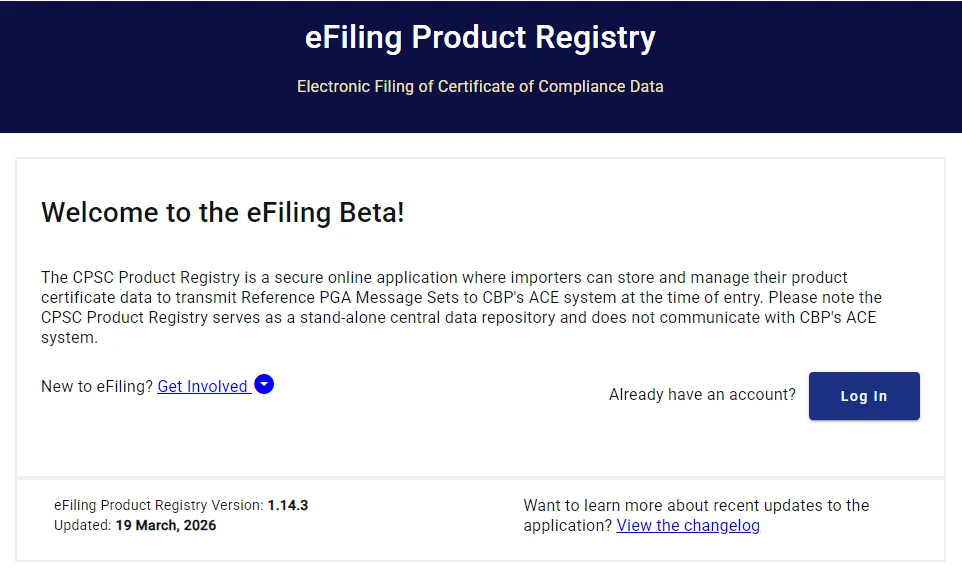
What exactly is eFiling?
In short, it is a mandatory electronic compliance filing system launched by the United States for imported consumer products. Its core is to link product compliance information directly with customs clearance. Any goods without completed filing will be denied entry by U.S. Customs and Border Protection (CBP).
Key Information of the New Regulation
• Effective Date: Officially enforced on July 8, 2026 (Voluntary filing is allowed during the current transition period. Early preparation ensures greater stability.)
• Coverage: More than 600 HTS tariff codes covering consumer products including toys, children’s articles, apparel, home appliances, furniture, safety helmets and more, basically covering mainstream Chinese consumer products exported to the U.S.
• Mandatory Requirements: Seven core data items of compliance certificates (CPC/GCC) must be electronically submitted to U.S. Customs prior to customs clearance. Otherwise, cargo detention, forced return shipments and substantial fines will be imposed.
Official Filing Channels
• Recommended: CPSC Official Product Registry System
Enter information to generate a exclusive certificate ID. Your customs broker will link the ID in the ACE system. This method features the lowest inspection rate and the most reliable compliance.
• Not Recommended: Directly fill in the seven data items in the ACE system
Though easy to operate, this approach leads to a sharp rise in customs inspection rate and a high risk of problems.
Required Documents for CPSC eFiling
Prepare all documents below before starting the filing process to avoid suspension and filing failure:
1. U.S. Importer IOR Registration Number
2. Complete information of the U.S. importer: Full enterprise name, physical address, authorized contact person, official email address and phone number
3. Original CPC/gcc compliance Certificate: Must fully contain the seven core data required by the new regulation, as well as information of the U.S. importer or U.S. Authorized Representative
4. Test Report issued by a CPSC-recognized laboratory: Only officially validated reports are acceptable for review
5. Real photos of product labels and packaging: Clearly display mandatory marks including UPC/GTIN commodity code, origin information and compliance warning statements
CPSC eFiling Procedures
Register for a CPSC Product Registry Account (The First Step for Compliance)
1. Visit the official CPSC eFiling page: [cpsc.gov/eFiling.](cpsc.gov/eFiling.) Select the Product Registry section and click Register Now to start registration.
2. Create a Business Account: Check the compliance statement and proceed to fill in information. A corporate email is required for registration. All submitted details must be fully consistent with the IOR registration records (no errors in company name and IOR number allowed).
3. Email Activation: After submitting the registration application, check your inbox for the activation email. Click the link to activate the account and set your login password.
4. Set up Certifier ID (Critical Requirement): After logging in, find Set your Certifier ID in the to-do list. Fill in the information of the U.S. authorized signatory (U.S. representative or person in charge of the importer) and submit. This ID serves as the unique certificate issuance ID in the CPSC system and will be bound to all subsequent product certificates.
5. (Optional) Add Users / Authorize Customs Brokers: Go to Admin → User Management. Invite colleagues or customs brokers via email and assign permissions for viewing, editing and certification to facilitate team collaboration.
Learn about the Seven Core Data Items (All Mandatory; Any Error Results in Invalid Filing)
All filing data must be 100% consistent with certificates, product labels and test reports. Details of the seven core data items are as follows:
Data Item | Filling Requirements |
Product ID | UPC/GTIN/SKU code. One code corresponds to one single product model; no duplication allowed. |
Citation Codes | Applicable regulations and standards, e.g. 16 cfr 1303, ASTM F963, cpsia, etc. |
Date of Manufacture | Production year and month, format example: 2026-03 |
Place of Manufacture | City and country of the manufacturing factory (in English), example: Dongguan, China |
Product Test Date | Date of the latest compliance test, must match the test report, example: 2026-04-15 |
Testing Laboratory | Name and official ID number of the CPSC-recognized laboratory |
Point of Contact | Name, phone number and email address of the U.S. Authorized Representative. Valid contact information within the U.S. is required. |
Single Product Upload (For Enterprises with Few SKUs)
1. Log in to the system and navigate to Product Registry → Products → Add Product.
2. Fill in the seven core data items one by one and ensure all information is accurate.
3. (Recommended) Upload the cpc certificate in PDF format and the first page of the test report as attachments.
4. Click Certify, check the compliance statement and submit. The filing is valid when the status changes to Certified.
5. Three key IDs will be generated: Certifier ID, Product ID and Version ID. Collectively named Certificate Identifiers, they are the core credentials to be provided to your customs broker for clearance.
Bulk CSV Upload (Strongly Recommended for Enterprises with Multiple SKUs)
1. Go to Products → Import → Download CSV Template to obtain the official template.
2. Fill in the seven data items in accordance with template rules. One row corresponds to one product. Do not combine multiple models and strictly follow field requirements.
3. Upload the CSV file. The system will automatically verify data. Revise error rows and re-upload if needed.
4. Select all products for filing and click Certify Selected to complete bulk certification for higher efficiency.
Coordinate with Customs Brokers & File via ACE System (Final Step for Customs Clearance)
Two cooperation methods are available. The first one is highly recommended:
• Recommended: Reference PGA Message Set
Send the three key IDs (Certifier ID, Product ID, Version ID) to your customs broker. The broker logs into CBP ACE system, selects CPSC eFiling under the PGA module and enters the three IDs. The system will automatically retrieve the seven core data from CPSC. Submit the application for customs review and clearance. This method has the lowest inspection rate.
• Not Recommended: Full PGA Message Set
The customs broker manually enters all seven data items directly in the ACE system. This method has a high inspection rate and great risks of data inconsistency. Avoid it unless under special circumstances.
Timeline Arrangement: Action Items to Complete Now
• May – June 2026: Complete account registration, get familiar with system operations, finish product testing, upload test data and verify the entire filing process.
• July 8, 2026: The new regulation takes full effect. All regulated products must complete eFiling; otherwise, customs clearance will be denied.
Register for a CPSC enterprise account → Bind IOR registration number → Set up Certifier ID → Fill in the seven core data accurately → Complete Certify certification → Send the three key IDs to your customs broker → Link information in the ACE system for clearance. Follow this process to achieve smooth and compliant customs clearance.
Email:hello@jjrlab.com
Write your message here and send it to us
 Guide to the EN18031 Testing Standard
 Amazon Lithium Battery Smart Home/3C Sellers Can N
 RoHS Compliance Testing Services
 Amazon Toy Seller Exporting to Europe Compliance
US Jewelry Compliance Guide
Amazon Toy Seller Exporting to Europe Compliance
US Jewelry Compliance Guide
 FCC Certification Requirements and Costs for Consu
 EMC Testing Lab IEC 60601 Medical Electrical Safet
 What are the FCC Testing Requirements for Bluetoot
Leave us a message
24-hour online customer service at any time to respond, so that you worry!